


Amish Kushwaha - October 1, 2026
Opening SAP’s AI Stack (3/3): Agents, A2A and MCP
In part 1, I looked at the gateway layer: the harmonized model API, orchestration pipeline, fallback behavior, billing and SDKs. Part 2 moved down the stack into serving your own models and building retrieval on HANA. This final part is about agents, the protocols connecting them, and what I take away from the stack as a whole.
Agents: two ways in, two protocols connecting them
Joule is the front door. A person, or another system, talks to Joule, and Joule figures out which agent should handle the request. The question for an engineer is how you get your own agent into that picture, and SAP gives you two routes.
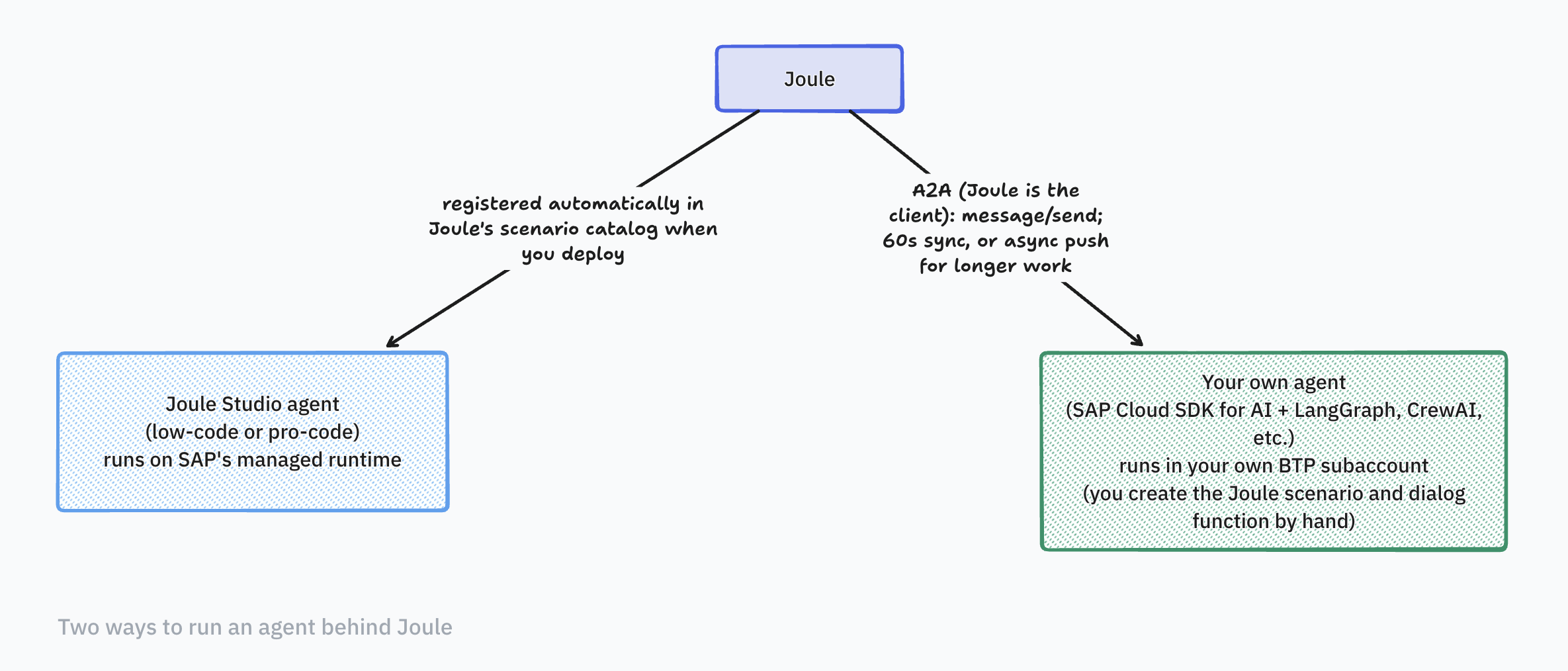
Build it inside Joule Studio. This is SAP’s own environment for building agents, with a low-code flow (browser-based, drag and drop) and a pro-code flow (your own IDE, connected to Joule Studio through a CLI and MCP). Either way, the agent runs on SAP’s managed runtime and is registered with Joule automatically. This is the path if you want to stay inside SAP’s tooling end to end.
Bring your own agent. This is closer to what I’d normally do. You write the agent yourself with the SAP Cloud SDK for AI, in Python, using whatever agent framework you’re already comfortable with. LangGraph and CrewAI show up a lot in SAP’s own sample code, but the SDK isn’t tied to one framework. You deploy it in your own BTP subaccount, so it’s your code and your infrastructure, not SAP’s. The only SAP-specific part is how it plugs back into Joule.
That plug-in point is where two separate protocols show up, and it’s worth keeping them apart in your head:
- A2A (Agent2Agent) is how Joule talks to your agent. It’s the conversation layer: Joule sends your agent a task, your agent works on it, and sends a result back.
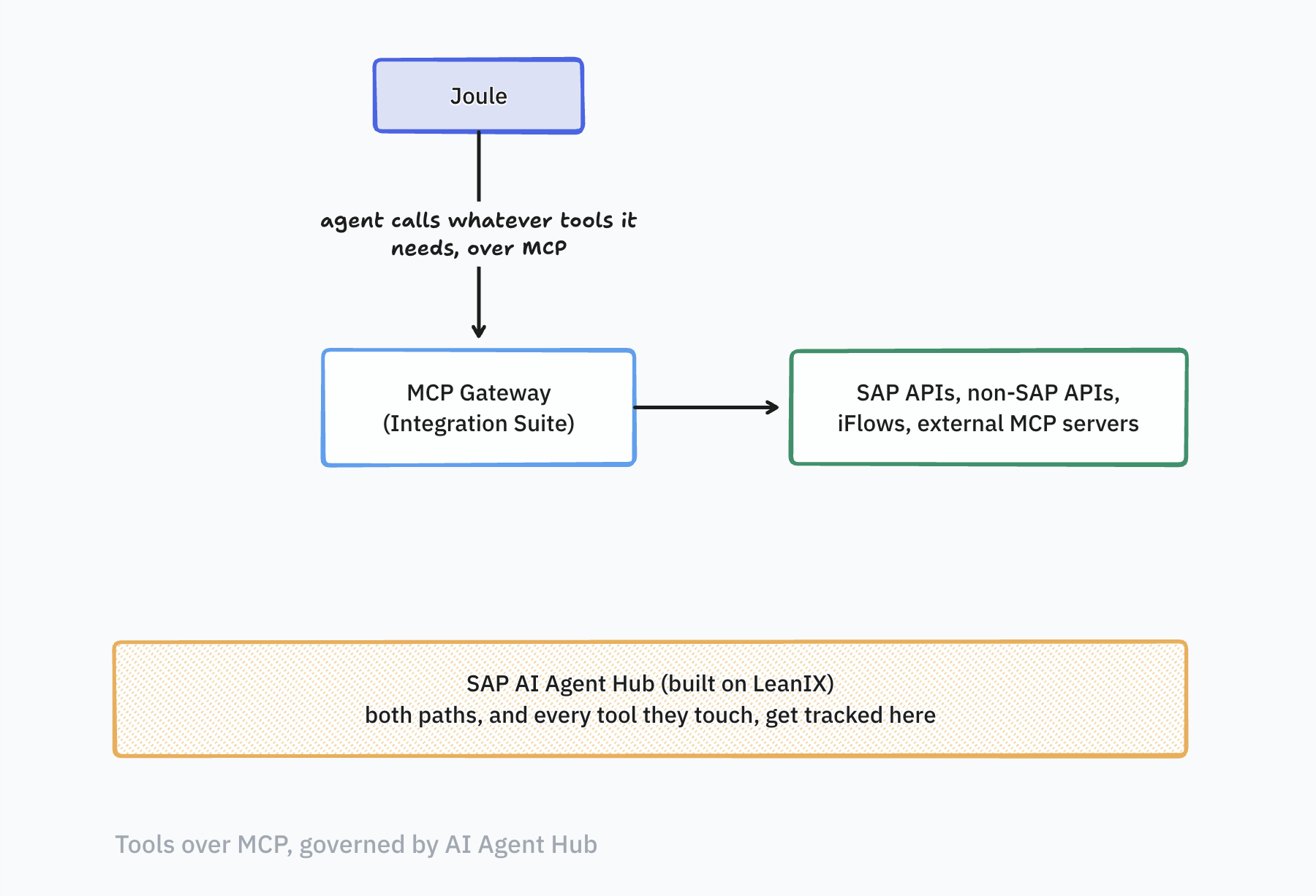
- MCP (Model Context Protocol) is how an agent, whether it’s yours or one Joule built itself, reaches tools and data. It’s the layer underneath that conversation, for calling a specific API or querying a specific system.
Laid out, the two paths reach Joule differently. An agent built in Joule Studio is registered automatically when you deploy it, while your own agent is called by Joule over A2A:
From there, an agent fans back out through MCP to reach the tools it needs:
- Joule acts as the A2A client and sends a
message/sendrequest to your agent. - Only the text message type is supported right now.
- Synchronous calls have a 60 second response window. Longer work goes through asynchronous push notifications.
- Trust between Joule and your agent is set up through SAP Cloud Identity Services.
- The page says Joule follows A2A version 0.3.0.
That last point is a thing to watch, not a complaint. A2A has since reached 1.0 under the Linux Foundation, and SAP sits on its technical steering committee. SAP’s own pages also carry a disclaimer that some parts of this reference architecture aren’t generally available yet, including the Agent Gateway, which would let external agents call Joule agents over A2A.
For MCP, the piece an engineer will actually touch is the MCP Gateway in SAP Integration Suite. It takes SAP and non-SAP APIs and turns them into MCP tools, behind OIDC authentication, rate limiting and tracing. Any MCP-compliant agent can call them, including ones built in Joule Studio. Outside of that gateway, SAP has also shipped a handful of purpose-built MCP servers for developer tooling: one each for CAP, UI5 and Fiori, and the newer agentic ABAP tooling is built around an ABAP MCP server. MCP itself had a large revision on July 28, 2026, that made the protocol core stateless. I couldn’t confirm which revision SAP’s gateway targets, so that’s a question I’ll be asking.
Whichever route you take to build an agent, and whichever tools it needs to call, the SAP AI Agent Hub, built on LeanIX, is where all of it gets tracked. It’s a registry for agents, LLMs and MCP servers, with a verification step (only verified MCP servers can be called in production), access control and tracing of tool calls. Plenty of teams end up building an inventory like this by hand; here it comes built in.
Side by side
| What I’d normally wire up | What the SAP stack offers |
|---|---|
| Model gateway (LiteLLM, Portkey, OpenRouter style) | Orchestration service with a harmonized API in AI Core |
| Guardrails from a separate service | Content filtering module (Azure Content Safety, Llama Guard 3) |
| PII redaction in my own code | Data masking through SAP Data Privacy Integration |
| Prompt management tooling | Prompt registry and prompt tools in AI Launchpad |
| Vector database of choice | HANA Cloud vector engine, with managed grounding pipelines |
| MCP servers I run and secure myself | MCP Gateway in SAP Integration Suite |
| Agent to agent over A2A | Joule as A2A client, Agent Gateway |
| A wiki page of which agents and tools exist | SAP AI Agent Hub (LeanIX) |
What I take from all this
The pieces I usually build myself are already here and documented: the gateway, guardrails, masking, the vector store and governance for tools and agents. The pieces I’m used to swapping out are less swappable. The vector store in the managed path is HANA, and the order of the orchestration pipeline is fixed. Whether that’s a good trade depends on how much you value having it all in one governed place.
That is the map I wanted from these three posts: start at the model gateway, follow the stack through serving and retrieval, then see how agents connect to one another and to their tools. I have more questions than I started with, which is usually a sign that the map was worth drawing.
Ready to transform your SAP experience?
Join thousands of developers using BlueFunda AI tools.