


Amish Kushwaha - September 30, 2026
Opening SAP’s AI Stack (2/3): Runtime, Retrieval and Data
In part 1, I looked at the gateway layer: the orchestration service, its fixed module pipeline, fallback behavior and billing. This part goes one layer deeper into AI Core as a general runtime, then follows the retrieval path down to the HANA vector store.
Bring your own model
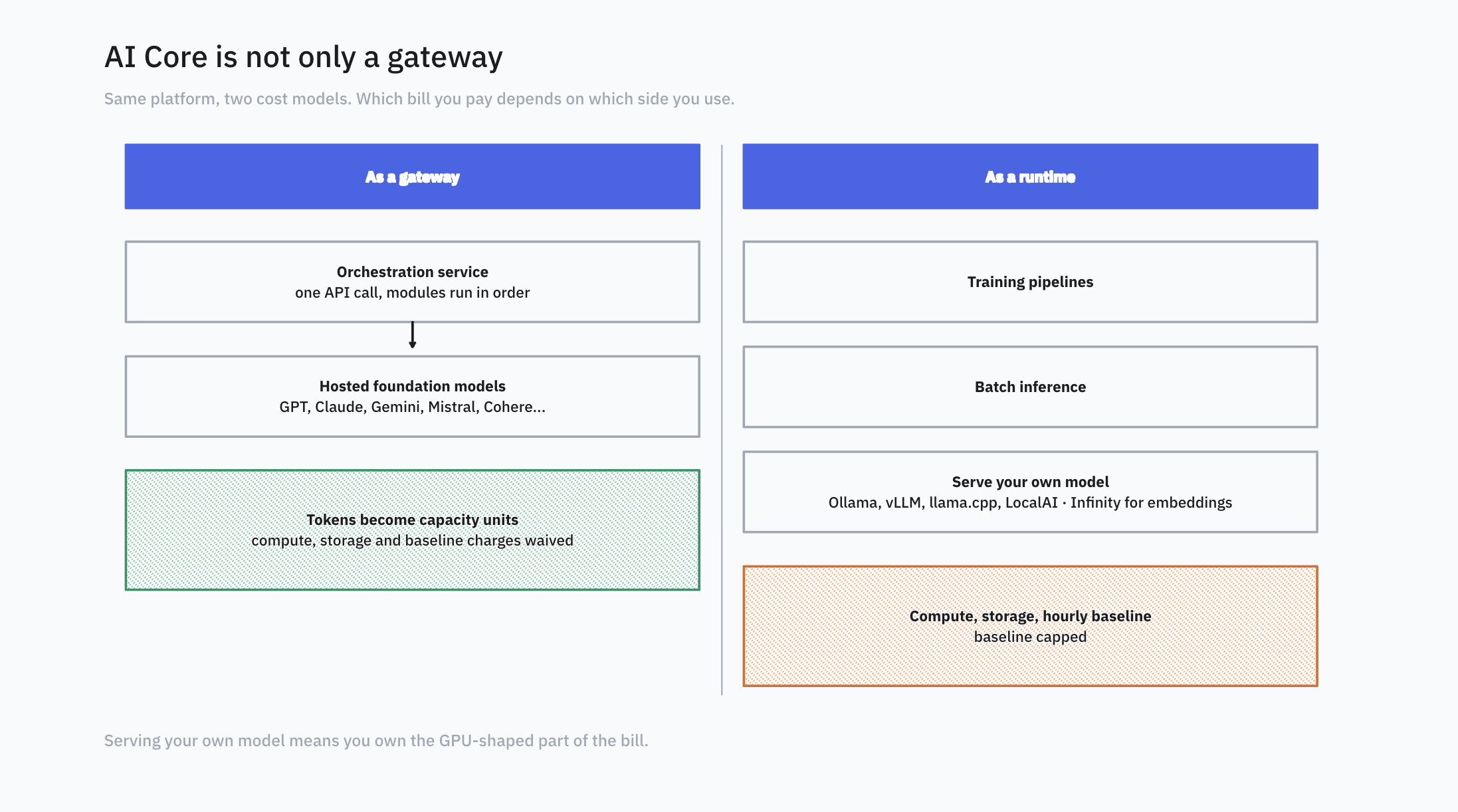
AI Core isn’t only a gateway. It’s also a general runtime for training, batch inference and serving your own models. SAP-authored community posts show open-weight models deployed through serving templates using Ollama, vLLM, llama.cpp and LocalAI, and Infinity for embedding models. The Launchpad guide also lists models from Mistral and IBM hosted through AI Core.
This is where the two cost models from part 1 come into play. Serving your own model means you own the GPU part of the bill.
Concretely, your model runs on GPU-backed compute inside your own BTP subaccount: the serving template reserves the accelerators and keeps your inference server (vLLM, Ollama, whatever you chose) warm whether requests are arriving or not. That is why you pay for compute and storage plus an hourly baseline rather than per token. With hosted foundation models, SAP carries that infrastructure and meters you only on tokens.
RAG, with HANA underneath
RAG, or retrieval-augmented generation, means pulling your own documents into the prompt at request time so the model’s answers are grounded in facts you control. It matters because it turns a model that guesses from its training data into one that can cite your actual sources, which is the whole point for business answers.
For retrieval, SAP splits document grounding into three APIs:
| Pipeline API | Vector API | Retrieval API | |
|---|---|---|---|
| What it does | Fetches documents from a repository, chunks them, embeds them, stores them in the HANA vector store | Stores and manages embeddings you’ve already generated, as vector collections | Runs a search against an already-populated repository and returns matching content |
| What you provide | A connection to the repository (credentials, folder or bucket) | Pre-chunked text and your own embeddings | A query, plus a reference to a Pipeline or Vector store |
| Document source | SharePoint, S3, or SFTP | Wherever you got them; chunking and embedding are on you | An already-configured Pipeline or Vector store |
| Involves an LLM call | No, this happens at ingestion time | No | No |
| Best for | Hands-off ingestion from a document store you already have | Custom chunking or embedding logic, or content that doesn’t live in SharePoint, S3, or SFTP | Testing retrieval quality on its own, or building a RAG flow outside the orchestration service’s grounding module |
Laid out side by side, the differences are mostly about where you enter the pipeline.
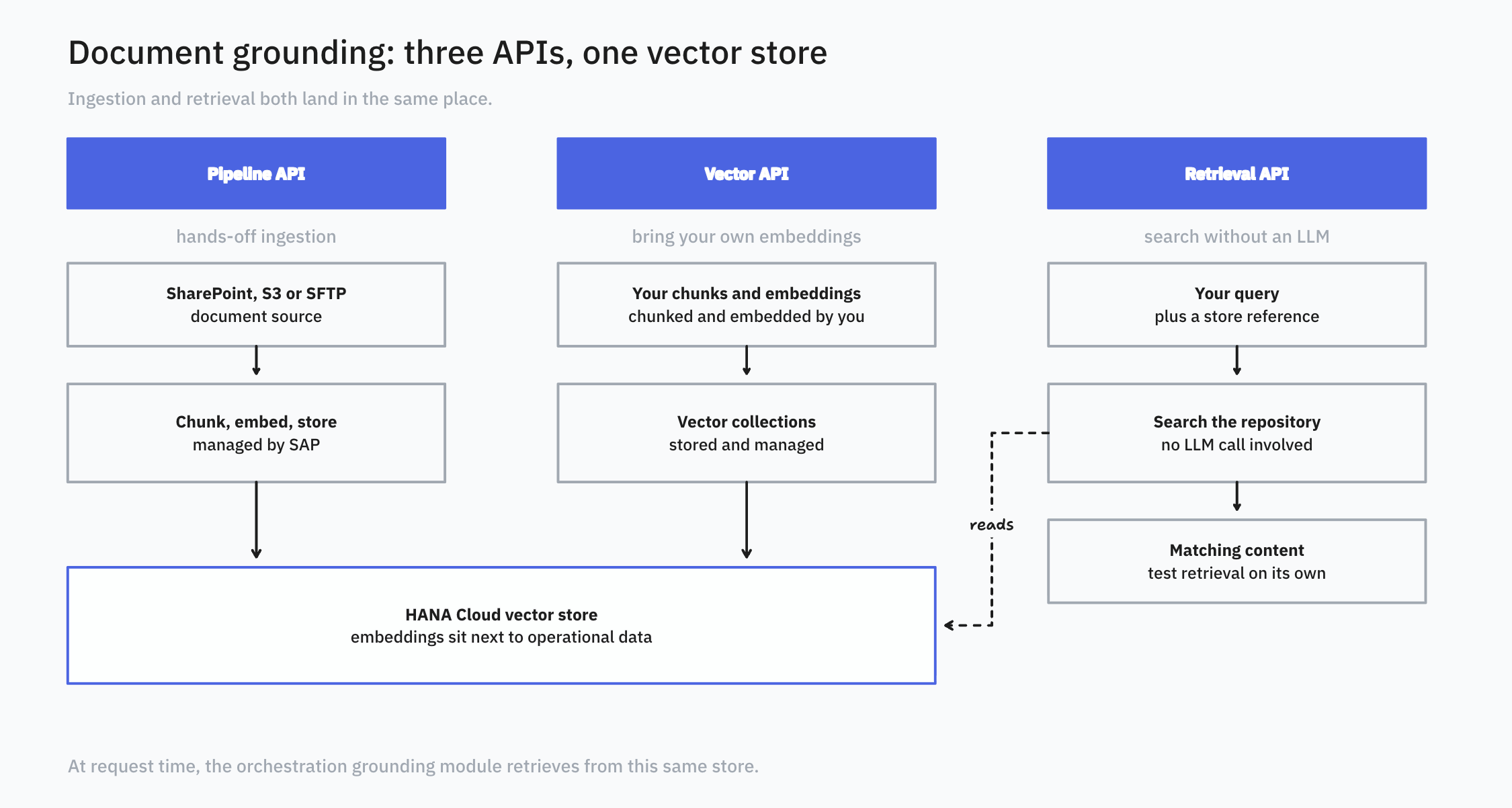
The grounding module in orchestration then retrieves context at request time. The SDK examples also show masking applied to the retrieved context, which I liked.
The thing to notice as a pipeline builder is that in the managed path the vector store is HANA. As far as I can tell, you don’t get to pick a different one there. The upside is that your embeddings sit next to operational data. The downside is less choice.
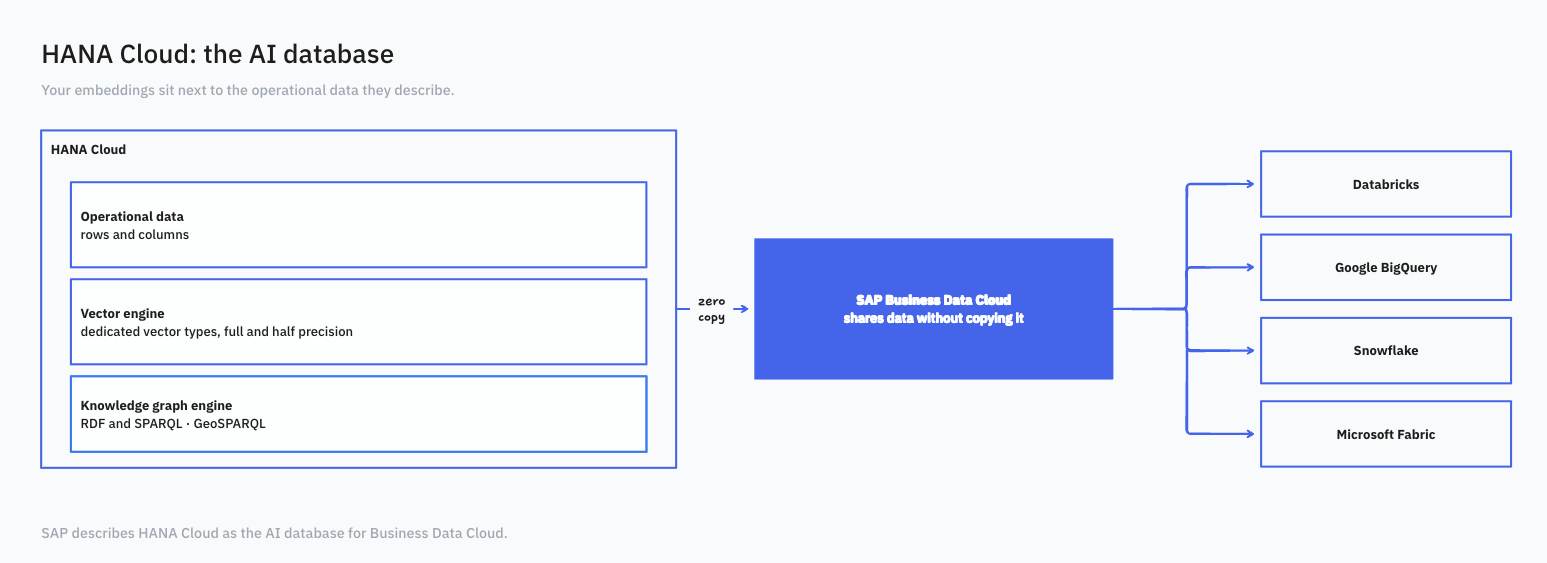
HANA Cloud’s vector engine has dedicated vector types for full and half precision. Next to it sits a knowledge graph engine built around RDF and SPARQL, and the September 2026 HANA Cloud update adds GeoSPARQL support to it. SAP also publishes LangChain integrations for HANA Cloud on GitHub, including one that talks to the knowledge graph engine.
Models that aren’t LLMs
The Generative AI Hub also serves SAP’s own models. SAP-RPT-1.5 and SAP-ABAP-1 are the two named on SAP’s product page:
| SAP-RPT-1.5 | SAP-ABAP-1 | |
|---|---|---|
| What it is | A tabular foundation model | A model for ABAP code |
| What it does | Predictions on structured business data | Explanation and generation of ABAP code |
| What SAP claims | No tuning and no ML pipelines needed | No additional claims |
I haven’t tried either yet, but I will definitely try soon to see how the claims hold up.
It’s still interesting to me. Most AI infrastructure talk outside SAP is about language models. A lot of business data is rows and columns, and SAP is shipping a model for that.
The data underneath
SAP Business Data Cloud shares data with Databricks, Google BigQuery and Snowflake without copying it, and lists Microsoft Fabric among its partners. General availability of the Snowflake pieces was announced in July 2026. SAP describes HANA Cloud as the AI database for Business Data Cloud.
What’s next
That is where I will leave the runtime and data side of the stack for now. In part 3, I’ll move up to Joule and the two ways to build agents, then separate A2A from MCP and look at the MCP Gateway, the Agent Hub registry and the final takeaway from this first tour.
Ready to transform your SAP experience?
Join thousands of developers using BlueFunda AI tools.