


Amish Kushwaha - September 29, 2026
Opening SAP’s AI Stack (1/3): The Model Gateway
I recently took a first tour of SAP AI Core, the Generative AI Hub, and the pieces around them. I’m coming to this as an engineer who has spent his time on AI infrastructure outside the SAP world, so I’m going to write down what I learn as I go. This is the first of three posts.
The series follows the stack from the bottom of a model call outward. Part 1 covers the gateway layer: orchestration, modules, fallback, billing, and SDKs. Part 2 will look at serving your own models and retrieval on HANA. Part 3 will move up to agents, A2A and MCP, and what I take from the stack as a whole.
A word on what this is. It’s a map, not a benchmark. I read documentation, SDK repositories, reference architectures, and community posts, and I’m sharing what stood out to someone who spends his days on the non-SAP version of this problem. Everything here reflects late September 2026. SAP’s docs move, so check the dates on anything you plan to build on.
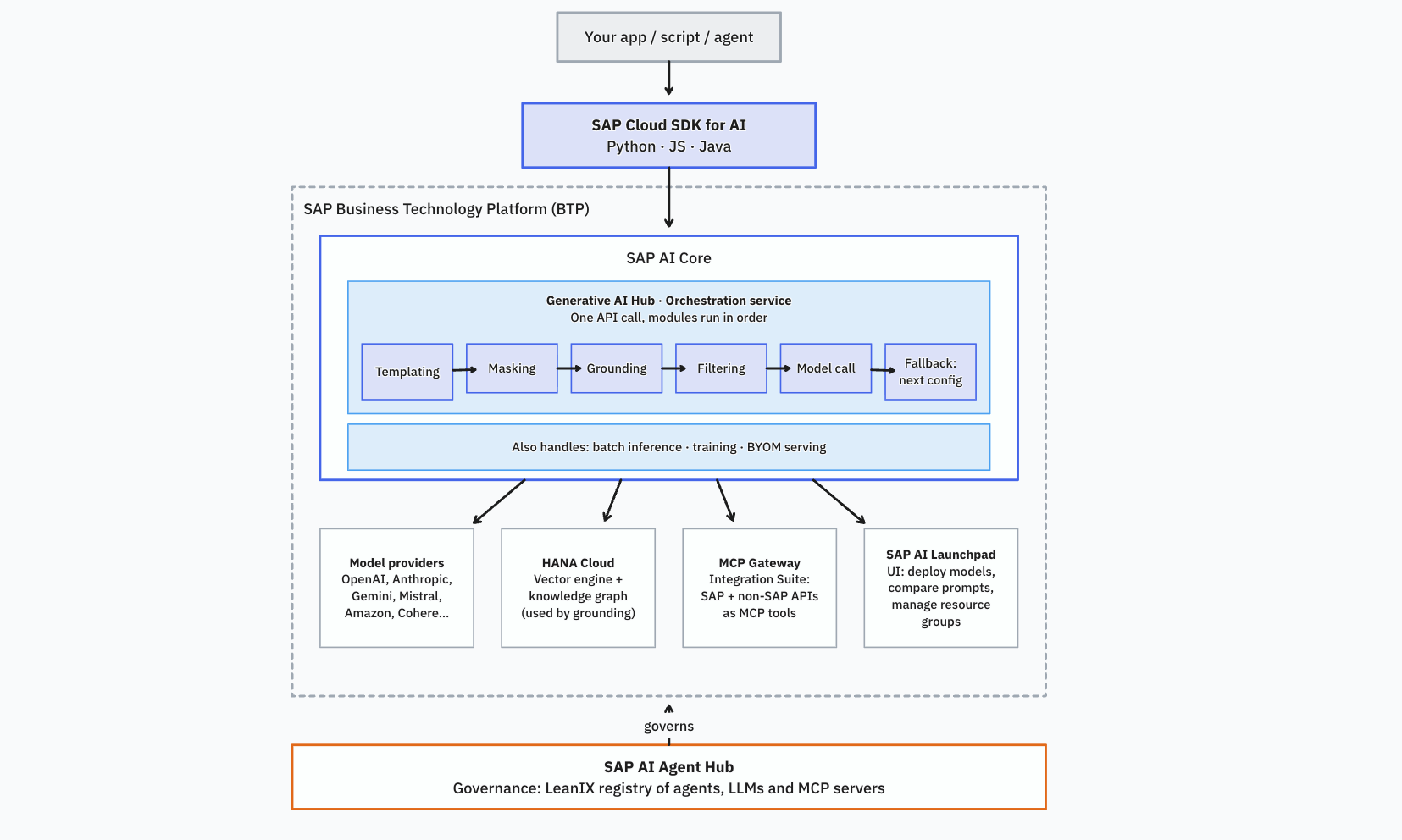
Here’s the shape of it before I get into any of the pieces individually:
The familiar part: a model gateway
The Generative AI Hub is a capability of SAP AI Core and SAP AI Launchpad. SAP’s own docs say it extends AI Core rather than replacing it. AI Core is the runtime, and the hub sits on top. You need the extended service plan to get the hub. There is also a 30-day trial that includes it.
The piece I’d call the gateway is the orchestration service. You create an orchestration deployment inside a resource group (the default resource group already has one), authenticate with the service key from your AI Core instance, and send requests to it.
The API is harmonized, which means SAP took the OpenAI API as the standard and maps other providers onto it. Switching models is a change to a model name string. Anthropic models use a double-dash convention, for example anthropic--claude-4.5-sonnet. The SDK’s model table currently lists models from Amazon, Anthropic, Google, Mistral, OpenAI, Cohere, and Perplexity. The authoritative list lives in SAP Note 3437766, which also carries token conversion rates, rate limits, and deprecation dates. I like having deprecation dates sitting next to the model list. Anyone who has had a model retired underneath a running product will know why.
The module pipeline
On top of plain model calls, a request can switch on modules: templating, grounding, translation, data masking, and content filtering. The docs also list tool calling, structured output, reasoning parameters, streaming, and embeddings on the same API.
The modules run as a pipeline in one call, and each module’s output feeds the next. SAP’s docs say the order is defined centrally. You configure the modules and leave out the optional ones, but you don’t reorder them. I didn’t see a way to insert a step of my own. If you’re used to gateway middleware you write yourself, that’s a real difference. For guardrails, it’s probably what you want anyway.
The fixed order looks like this:
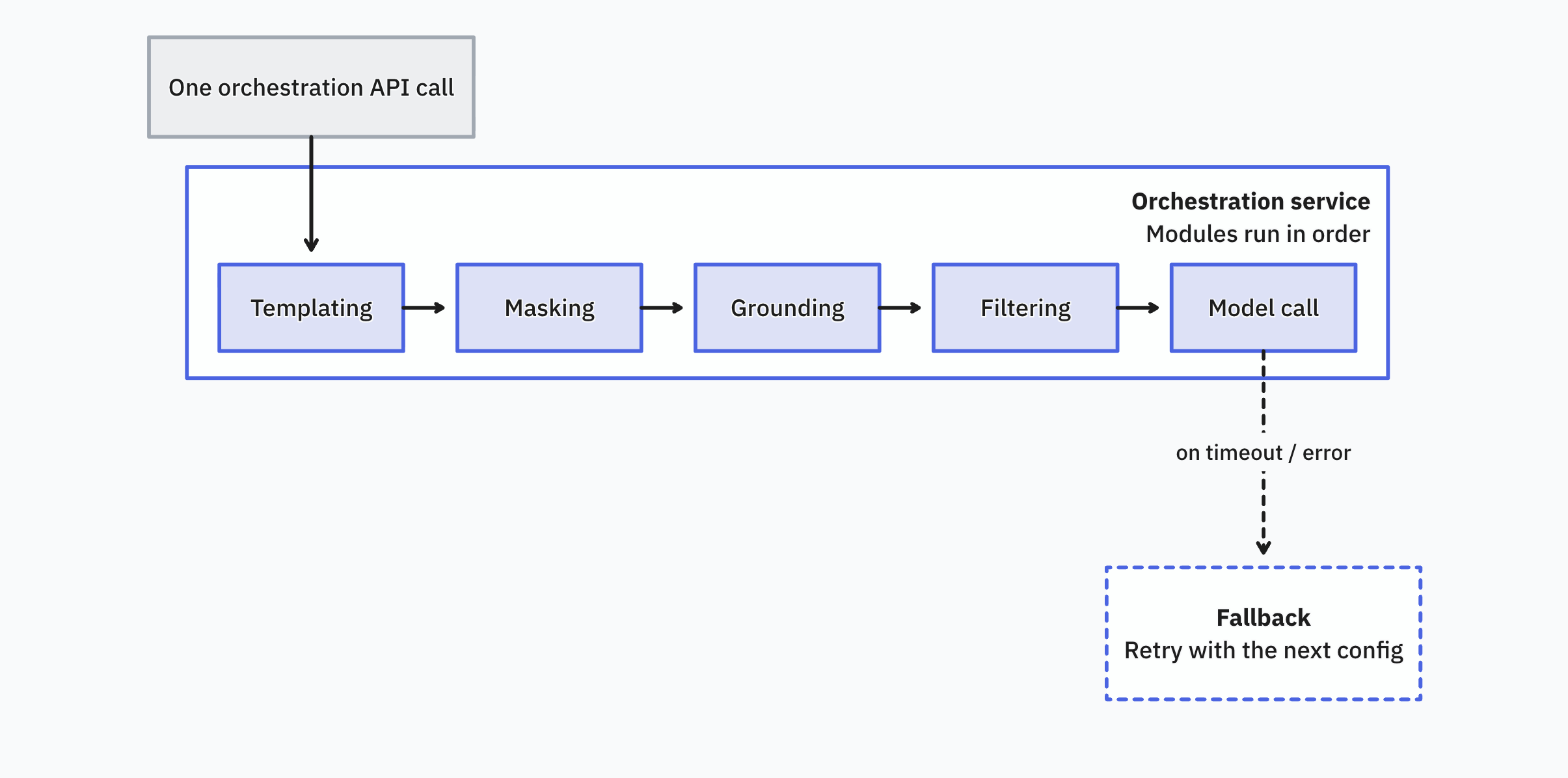
- Templating: Fills in your prompt placeholders.
- Masking: Masks PII before it leaves you, via SAP Data Privacy Integration.
- Grounding: Pulls retrieved context from the HANA vector store.
- Filtering: Runs a safety check on input and output, via Azure Content Safety or Llama Guard 3.
- Model call: Sends the request to the LLM. On a timeout or error in a non-streaming call, it retries the next fallback config.
Optional modules are just left out of the chain, not moved around in it.
Two modules deserve a closer look:
- Data masking: Uses SAP Data Privacy Integration. You can anonymize, which is irreversible, or pseudonymize, which lets the service put the original values back into the response.
- Content filtering: Supports Azure Content Safety and Llama Guard 3 (the 8B model). Azure covers hate, violence, sexual content, and self-harm on a severity scale, and it has a prompt shield option.
Fallback, since that’s my day job
Routing and failover are what I know best, so I went looking. You give the client an ordered list of module configurations, and the service tries them in sequence until one succeeds. Each entry can carry its own model, parameters, system prompt, filtering, and masking settings. So your fallback model can run under different rules than your primary.
A few details from the SDK docs that I’d want to know before relying on this:
- There is a timeout setting on the model. In non-streaming calls, exceeding it triggers the fallback. It applies to the individual LLM call, not the whole orchestration request.
- For streaming, the fallback happens before the stream starts. The service will not switch models in the middle of a stream.
- Content filter hits and invalid input errors do not trigger a fallback.
What I did not find in the docs I read is weighted routing, cost-based or latency-based routing, or circuit breaker state. That doesn’t mean they don’t exist, only that I didn’t see them. The open-source and hosted gateways people run today, such as LiteLLM and Portkey, document routing, caching, retries, and spend tracking, so if you need those knobs you may still want your own layer.
Billing and SDKs
Generative AI usage is metered in tokens and converted to capacity units against your BTP contract, but which costs apply depends on whether you’re calling a hosted model or running your own:
| Foundation models (hosted by SAP) | Custom / BYOM models (you serve them) | |
|---|---|---|
| Billed by | Tokens, converted to capacity units | Compute, storage, and an hourly baseline |
| Compute, storage, baseline charges | Waived | Charged; baseline is capped at 730 hours a month |
| Covers | Calling GPT, Claude, Gemini, and so on through orchestration, plus grounding | Running Ollama, vLLM, or your own inference server on AI Core |
The official SDKs cover JavaScript/TypeScript, Java, and Python, all Apache 2.0. The JavaScript one is the easiest to see the shape of, since it’s split into separate npm packages:
| Package | Covers |
|---|---|
ai-api | Scenario and workflow management: training pipelines, batch inference, deploying inference endpoints |
orchestration | The orchestration service itself: templating, grounding, masking, filtering, fallback, tool calling |
foundation-models | Calling a specific deployed model directly, without going through orchestration |
document-grounding | The Pipeline, Vector, and Retrieval APIs for RAG |
prompt-registry | Storing and versioning prompts |
langchain | LangChain-compatible model clients, built on top of the foundation-model clients |
Python and Java package it a bit differently, but cover the same ground. I write mostly Go, and I didn’t find an official Go SDK.
There’s a workaround that I found interesting. SAP contributed a provider to LiteLLM, reached with a sap/ prefix, covering chat completions and embeddings. That means you can put your own gateway in front of SAP’s, and SAP’s orchestration becomes one upstream among several.
What’s next
So far, the SAP stack looks familiar in the places closest to the model call: one gateway API, a fixed module pipeline, ordered fallback, contract-based billing, and SDKs for the main supported languages. The more SAP-specific part starts when the platform stops being only a gateway. In part 2, I’ll look at AI Core as a runtime for your own models, the document grounding APIs, and HANA’s vector engine. That post lands in a day or two.
Ready to transform your SAP experience?
Join thousands of developers using BlueFunda AI tools.